Pros and Cons of Jailbreaking

undefined

Jailbreaking as a whole has many pros, but it also has many cons. I think the pros do outweigh the cons though, with some of the pros including the ability to theme your device any way you want, being able to explore the files of the device, adding new functionality that makes the device easier to use, having it be a good conversation starter, and so much more. Unfortunately, every good thing does have cons to it and Jailbreaking is not limited to that. Jailbreaking exploits your device to let you do with what you want, but modifying anything like that can have some issues with it, such reduced device functionality and many instabilities if something were to go wrong, where you could spend hours troubleshooting a simple issue, or for worse, brick your device. Bricking your device is a term meaning it cannot be fixed, and the device would be as useless as an actual brick. This happens rarely though, but can happen by installing a tweak from a pirated repo or a tweak intentionally made to brick your device, essentially a computer virus for an iPhone. If you know what you are doing, there is a lower chance for it happening. It is best if one is interested in the world of Jailbreaking to do alot of research and learn alot about it beforehand, because it is best to know what you are doing beforehand. Going into it head first not knowing a thing could increase the risk for issues of your device. Personally, I do recommend Jailbreaking as it opens up a whole new variety of options and creativity to the iPhone and it lets your mind go wild. If you have a Jailbroken phone in public, you’re sure to catch some attention because a lot of people do not know much about it and it’s overall a fun thing to do.

How to Jailbreak

undefined

Some people today who are new to Jailbreaking as a whole think Jailbreaking a very time consuming and difficult task, when in fact it is not. In today’s day in age of jailbreaking, it only takes up to a minute. For example, let’s say we have an iPhone 8 running on iOS 11.3.1 and we want to Jailbreak it. For this example we will use the unc0ver jailbreak, as all you have to do is go to the unc0ver website, which is the developer’s github page (https://github.com/pwn20wndstuff/Undecimus/releases) and download the latest release, along with Cydia Impactor. Cydia Impactor is a tool that lets you ‘side-load’ apps to your device without using the app store. Application files for the iPhone use a .ipa file format as it can be read by iOS and explore those files to make a functional app. By downloading the unc0ver.ipa to your computer, you then plug your phone into your computer and drag and drop the .ipa into cydia impactor and let it install, once it is installed a new app will be on your phone. Open the new app, which is named unc0ver, and all you have to do is click the Jailbreak button, and everything will be done automatically. That’s it, It’s a very simple task to do and your phone will now be installed with the Jailbreaking tool Cydia. Cydia was made by Jay Freeman, also known as “saurik”. It’s first initial release was on February 28th, 2008 and is still one of the main package managers used today. People have tried making new package managers, saying Cydia is too ‘old’ and ‘outdated’ but all these new attempts haven’t lived up to how good Cydia has been, with it still being very stable even 12 years later and runs perfectly fine.

History of Jailbreaking

undefined

In the previous two articles we’ve gone over some functionalities and Jailbreaking as a whole, but how did it all start? There are many, many, different Jailbreaking tools, and each are dependent on many different things, such as processor chip, iOS version, phone model, etc. One of the first jailbreaks was called Redsn0w and was primarily made for the iPhone 3gs. It was one of the first mainstream jailbreaks and helped to kick off the jailbreak scene as a whole, and there was always different types of tools per iOS, multiple tools for the same iOS as well. Some other example tools that were made for iOS 3 were Purplera1n, Sn0wbreeze, and Limera1n. These jailbreaks are now what is known as untethered, meaning when the device reboots it will still be in a Jailbroken state compared to modern semi-untethered, where the device can be Jailbroken but needs to be re-jailbroken to reload the system daemons and reload all the tweaks upon a restart of the device. Redsn0w was the main tool used to jailbreak all the way up to iOS 7, then a new tool was developed called Pangu. Pangu was the king of iOS jailbreaking bringing alot of new functionality to the table to adjust to the new features of each iOS, and added alot more stability. Pangu only lasted until iOS 9 though, as with iOS 10 a bunch of new tools were developed, and iOS 10 was the time I, myself, was introduced to the Jailbreaking scene. Some of these new tools included Doubleh3lix, Meridian, Yalu102, Saigon, G0blin, and Totallynotspyware. Personally, I always used Yalu102 because that’s what I was so used to but the other tools as well were great tools. iOS 10 Jailbreaking lasted a long time, until iOS 11 finally was Jailbroken by the new and rising developer Coolstar, with his Jailbreaking tool called Electra. Electra started the iOS 11 Jailbreak, and was the only tool for awhile, then a new software was developed known as Unc0ver. Unc0ver and Electra, now known as Chimera, is still the current top jailbreak tools today for iOS 11 and 12, but for iOS 13 a new ‘super-jailbreak’ tool was developed known as Checkra1n, as it could jailbreak any iOS version including the newest versions of iOS 13. Currently Checkra1n has no windows support but will get it soon, as you need a mac to use it, but is still a very powerful tool and is currently the newest one available. iOS Jailbreaking has had quite a history and is sure to grow even more in the coming years.

Functionalities of Jailbreaking

undefined

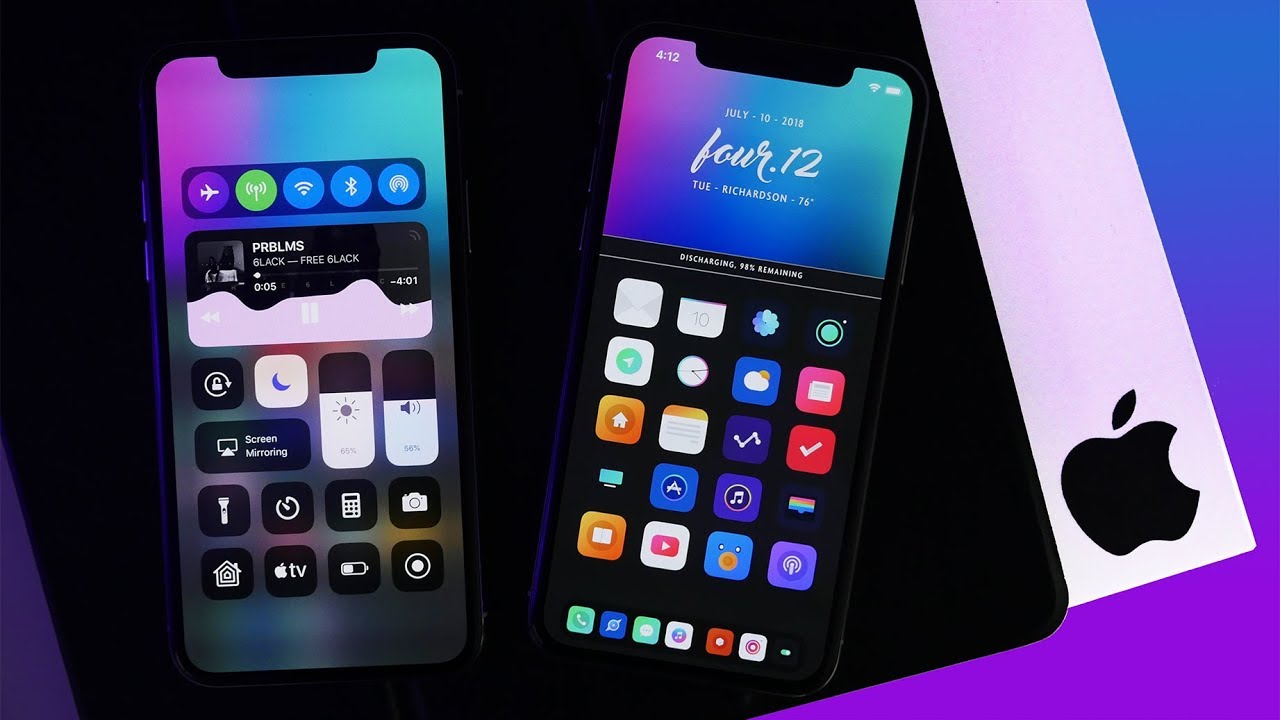
The first article goes over what a jailbreak is, but what can you really do with it? Some main core functionalities of a jailbreak are shown in the image above, completely transforming the look of the stock iPhone to be something truly extravagant. You can make your own themed icons and upload them for other people to use, or download themes other people have made. In Cydia, the main jailbreaking tool, you download the extension called Anemone, which then will let you downloaded themes, and you can manage them through the Anemone app. Creativity can thrive here as you can show off your phone to other people and have your phone not look like boring stock iOS. Many themes for anemone have been created, and some very popular ones include Stencil, Limit, Linear 2, Vexillium, etc, as these themes completely change the look of the icons to have a neon ‘glow’ effect to it and can really help some wallpapers stand out. Some other functionalities of it that you don’t see on screen can come with ease of access, such as the tweak SlideCut which adds the computer equivalent of control c, control v, and control s, which on the phone would in turn translate to sliding your finger from space c, to space v, to space s, respectively. Another functionality tweak, DoubleCut, adds a watered down version of macros to your iDevice. For example, you could press a letter 3 times in a row and it could auto change those three letters to be whatever text you want, this is useful for entering emails and passwords and such as you can just use the macro keys to automatically paste the information for you instead of having to type it out each time. There are currently thousands, or even tens of thousands of modifications or “tweaks” you can download with a jailbroken device and it is all up to your imagination.

iPhone Jailbreaking

undefinediPhone Jailbreaking is a not as familiar topic to the public eye, as it hasn’t had much exposure to it. It has been around for many years, going all the way back since the first iPhone and essentially it is an iPhone hacking tool. It lets you go into the phone and exploit it to add new features that Apple previously did not intend, using the tool called Cydia. In order to get Cydia though, you need to use an external software to install it. There have been many Jailbreaking softwares ranging from redsn0w all the way up to modern tools, such as unc0ver, Chimera, and Checkra1n. with redsn0w, it used to be a lot more complicated to do, but now with modern tools you can just press a button and Cydia will install, resulting in you being Jailbroken. Some people used to think that Jailbreaking is actually Illegal, but it’s completely fine. Jailbreaking is just a thing you can do with your phone to make it better in nearly every way, and is becoming a rapidly growing community. With a Jailbreak, you can do basically whatever you want with it, customizing the look of the phone to stand out with themes or add new compability features to make the phone easier to use, maybe even use it to mess around with your friends and gain public attention, you can even use it to explore the files of your phone, like a file explorer on windows, and see new hidden features for applications and overall explore what’s inside your phone. File exploration on iPhones can be used for many many things for modifying some files to gain an advantage in a game, or use it to edit .css coding for themes and widgets on the home screen, overall it is a very useful tool. It has gained a lot of popularity recently, and is sure to become even more popular as time goes on.

Create your own website, free on WordPress.com.Create your own website.
Start free